
The easiest receipt system is to connect each receipt to the purchase it belongs to, use consistent product and retailer names, and keep the documents needed for returns, refunds, warranties or records.
Key takeaways
- Organize each receipt around the purchase it supports, not only by date.
- Capture complete, readable images and use specific product and retailer names.
- Keep only useful copies and protect payment or personal details that are not needed.
In this guide
Organize receipts by purchase, not only by date
A chronological folder can tell you when money was spent, but it does not always tell you which receipt belongs to a particular product. Instead, make the purchase the central record. Keep the receipt with the product name, retailer, purchase date, relevant deadlines and later return or warranty documents.
This approach mirrors the way receipts are normally needed. You are more likely to search for proof for a specific pair of headphones or appliance than to remember which email arrived on a particular day. The purchase becomes the useful label; the date remains one detail within it.
Photograph paper receipts early
Paper receipts can fade, tear or disappear into bags and drawers. Photograph one while the print is clear. Place it on a flat surface, use good lighting and include the complete receipt in the frame. Before putting the original away, confirm that the retailer, date and total are readable. Retake blurry photos immediately.
Include the item description, order or transaction reference and return information when they appear on a second page or the reverse side. Keep the original paper when a retailer, warranty provider, accountant or local rule may require it.
Save digital invoices
For an online purchase, save the final invoice or receipt rather than relying only on an order-confirmation email. An early confirmation may change if an item is cancelled, discounted or shipped separately. Download the stable document when available and keep the original email if it contains useful return instructions.
Use a file format you can open later and confirm that the saved copy contains the retailer, purchase date, item and amount. If the invoice is accessible only through an account, keeping a local copy can reduce dependence on the retailer’s retention period.
Use clear and consistent purchase names
Name the purchase with enough detail to recognize it without opening the receipt. A strong name often combines the brand and model. For example, “Sony WH-1000XM6” is useful because it identifies the exact product; “Headphones” is weak because it could describe several purchases.
Use the same product name wherever the purchase appears. Keep retailer names consistent too—for example, choose the retailer’s familiar name rather than alternating between a website domain, parent company and abbreviation. Consistency makes browsing and searching more reliable.
Keep the documents that remain useful
A useful purchase record may grow beyond the original receipt. Keep a final invoice, return confirmation, carrier receipt, refund confirmation, warranty terms, registration confirmation and repair record when they apply. Label each document by purpose so the original proof of purchase remains easy to distinguish.
Avoid collecting documents simply because they exist. Promotional emails, duplicate order confirmations and repeated screenshots make the important evidence harder to find. Keep the clearest, most authoritative copy and remove unnecessary duplicates.
Protect private information
Receipts can contain names, addresses, loyalty identifiers, payment references or partial card details. Store them only where you are comfortable keeping that information and protect access to the device or account. Do not share a complete receipt publicly when a cropped or redacted copy would answer the question.
Before sending a receipt to another person or support channel, check what information is actually required. Preserve an unedited original for your own records when appropriate, and make a separate redacted copy for sharing.
Review older receipts periodically
Schedule a light review rather than allowing every receipt to remain forever. Purchases with an open return, pending refund, active warranty, tax purpose or unresolved support case may still need their records. Others may no longer be useful once every relevant period has ended.
During the review, remove unreadable or unnecessary duplicates, confirm that important files still open and retain documents required for financial, legal or recordkeeping reasons. Appropriate retention varies, so use the rules that apply to your situation.
Common receipt-organization mistakes
- Keeping receipts in one large date-based folder without linking them to products.
- Photographing only part of a receipt or failing to check whether the text is readable.
- Using vague purchase names that cannot distinguish similar items.
- Relying on an online account as the only copy of an invoice.
- Keeping many duplicates while missing the final receipt or return confirmation.
- Sharing receipts without checking for private details.
Practical checklist
- Add a clear product name
- Save retailer and purchase date
- Photograph the complete receipt
- Check that important text is readable
- Connect the receipt to the purchase
- Keep return confirmation
- Remove unnecessary duplicates
- Protect private details
How ReturnPing helps
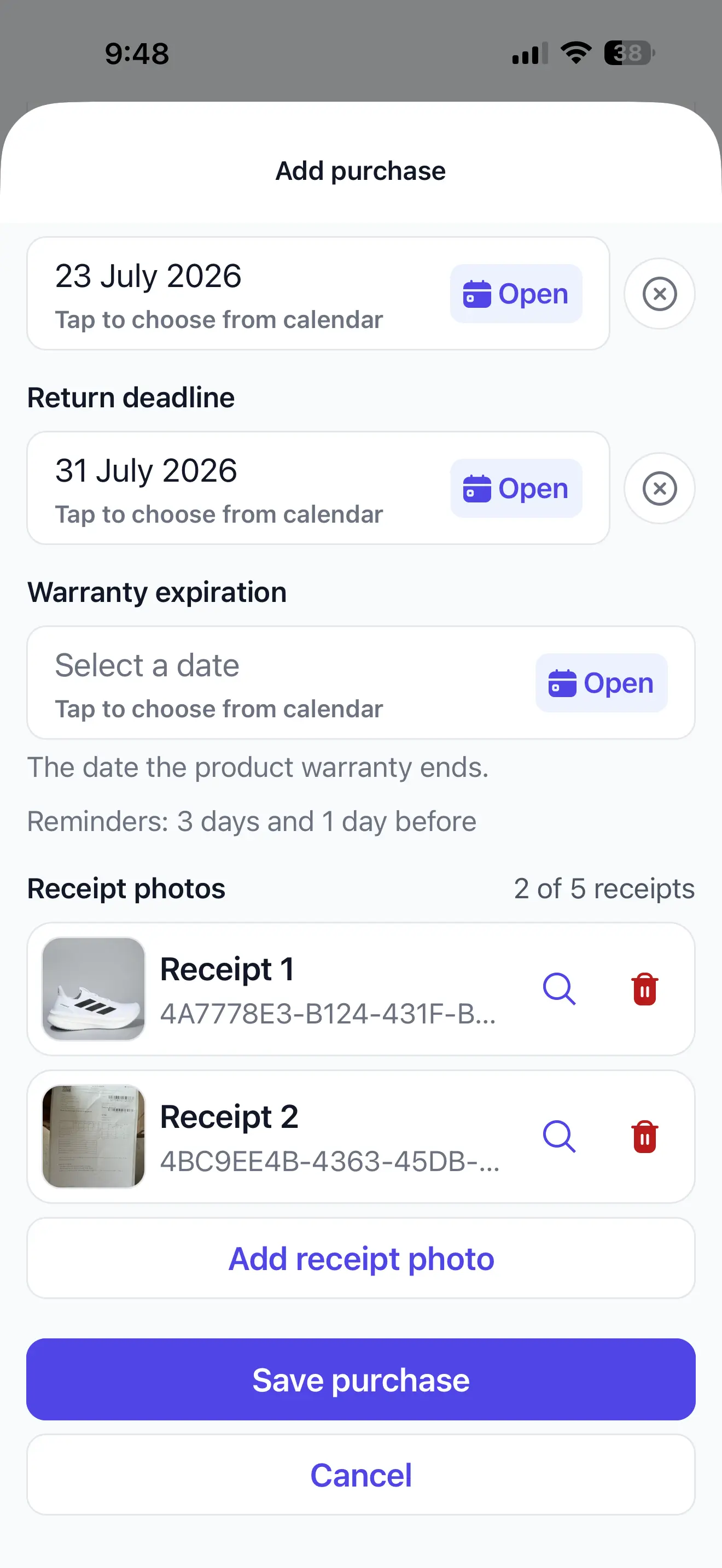
ReturnPing keeps a selected receipt or invoice image with the purchase it supports, alongside the product name, retailer and important dates you enter. That connection makes the document easier to find when you are preparing a return, checking a refund or reviewing warranty information. ReturnPing does not claim to read the receipt automatically; you choose the document and confirm the saved purchase details.
See how a selected receipt image is attached to a ReturnPing purchase.