
Track a pending refund by recording when the item was returned, the expected amount, the retailer’s estimated processing date and the original payment method. Keep the return confirmation until the money appears.
Key takeaways
- Treat the return and the refund as separate events with separate dates.
- Keep the expected amount, payment method, retailer estimate and proof of return together.
- Refund timing varies; follow up after the applicable estimate rather than assuming a universal period.
In this guide
A return and a refund are separate events
Sending an item back completes the return action, but it does not confirm that the refund has reached you. The retailer may still need to receive the package, inspect the product, approve the return and send a credit through the payment system. Treat the return date and the refund-received date as two distinct milestones.
This distinction prevents a common gap: the return disappears from your task list while the money is still outstanding. Keep the purchase open as a pending refund until the expected amount appears in the correct account.
Save the return date
Record the date you handed the item to the carrier, dropped it at a collection point or completed the return in store. Also record the method. A shipped return may have both a drop-off date and a later delivery date; keeping both makes it easier to understand where the process stands.
If the retailer says refund processing begins only after the warehouse receives the item, the carrier’s delivery event becomes especially useful. Do not replace the original drop-off date—add the delivery date as another part of the timeline.
Record the expected refund date
Use the retailer’s estimate from the return flow, confirmation email or support response. Save the date or date range with a note describing the source. If the retailer gives only a processing estimate, calculate a practical follow-up date from the relevant event and label it as your reminder rather than as a guaranteed arrival date.
Record the expected amount
Write down the amount you expect to receive, not only the original order total. Shipping charges, discounts, restocking fees or a partial-item return can make those numbers different. If several items were returned from one order, note which items are included and whether the retailer expects to issue one refund or several credits.
Recording the amount gives you a clear comparison when a credit appears. It also helps you identify a partial refund instead of marking the entire return complete too early.
Keep proof of the return
Save the return confirmation email, carrier receipt, tracking number and any retailer return authorization number. For an in-store return, keep the printed or emailed return receipt. These records show what was returned, when it entered the process and which reference numbers support a follow-up.
Do not discard the documents when tracking first shows delivery. Keep them until the refund is received and the amount is correct. A delivered parcel confirms movement, not necessarily approval of the refund.
Check the original payment method
Refunds are commonly sent back through the original payment route, but the visible destination may not be obvious. A card purchase may appear as a credit on the card account rather than in a current account. A digital wallet may show the update before the linked bank does. Store credit or gift-card purchases may be restored to a retailer balance.
Record the expected payment method without saving sensitive card numbers. A short label such as “credit card ending 42” or “store credit” is enough to direct your check to the right place.
Follow up when the expected date passes
If the retailer’s expected date or range passes without the refund, check each stage before contacting support. This gives you a current picture and the details needed for a focused question.
- Check the return tracking.
- Check the retailer account.
- Review the refund confirmation.
- Check the original payment method.
- Contact the retailer with the order and return details.
When contacting the retailer, include the order number, return authorization, return date, carrier tracking and expected amount. Ask for the current status and a revised estimate. Save the response and update your next follow-up date rather than relying on memory.
Mark the refund as received
When the credit appears, compare the received amount with the amount you recorded. Confirm that every returned item is covered and note the date the refund became visible. Then mark the refund as received and keep the supporting records long enough to resolve any mismatch or reversal.
If only part of the expected amount arrives, record the partial payment without closing the full refund. Keep the remaining balance visible and follow up on that difference.
Common refund-tracking mistakes
- Assuming the return is finished as soon as the package is shipped.
- Using a general refund estimate instead of the retailer’s estimate for the specific return.
- Checking only one bank account instead of the original payment method.
- Forgetting that multiple returned items may produce separate credits.
- Deleting the return confirmation before the amount is verified.
- Following up without the order number, tracking details or return authorization.
Practical checklist
- Save return date
- Save expected amount
- Record expected refund date
- Keep return confirmation
- Keep tracking number
- Confirm payment method
- Follow up after the expected date
- Mark refund received
How ReturnPing helps
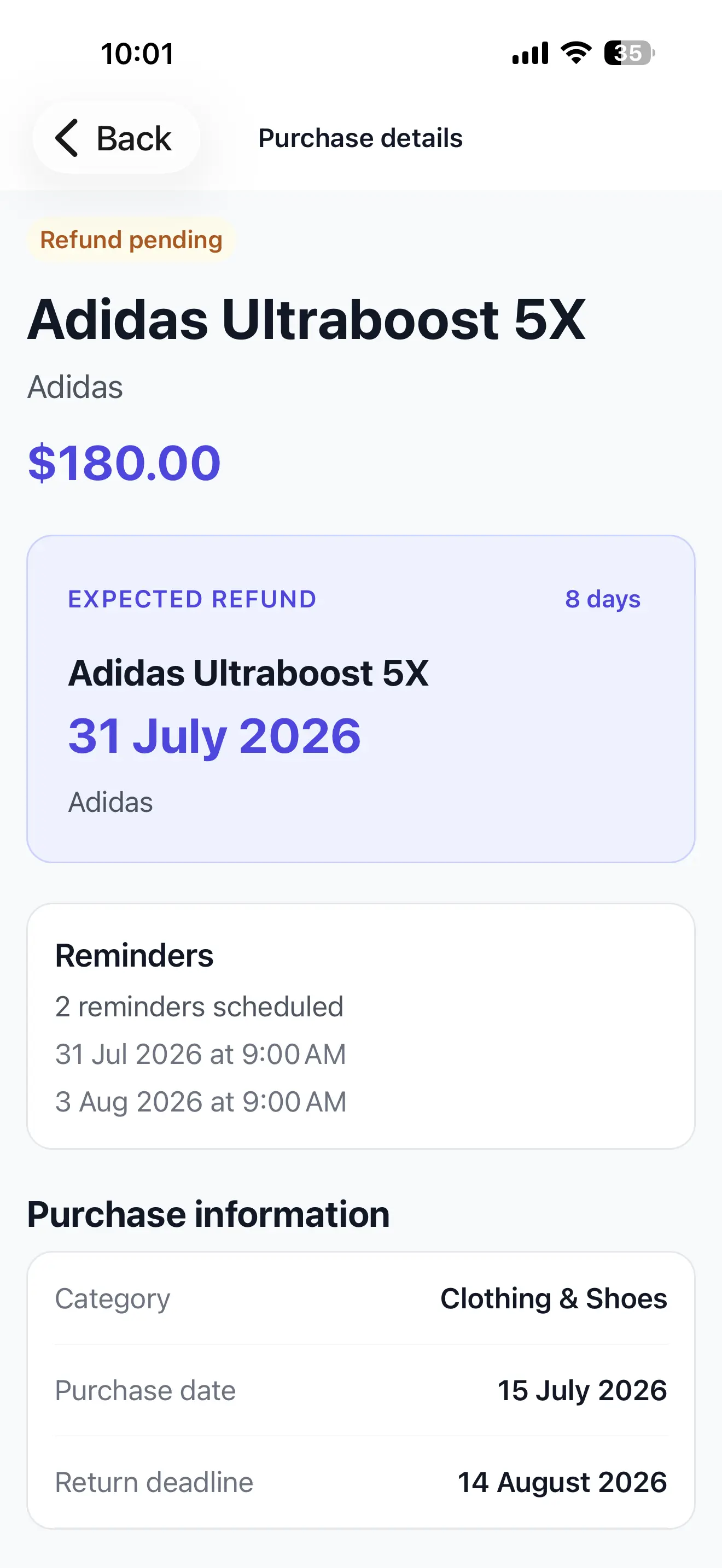
ReturnPing keeps the returned date, expected refund date, expected amount, payment method and confirmation details with the original purchase. You can keep the refund visible while it is pending, add a follow-up reminder based on the retailer’s estimate and mark it received only after the credit appears. The dates remain based on the information you enter, so retailer and payment-provider updates should still be verified.
See how ReturnPing tracks a purchase through return and refund completion.